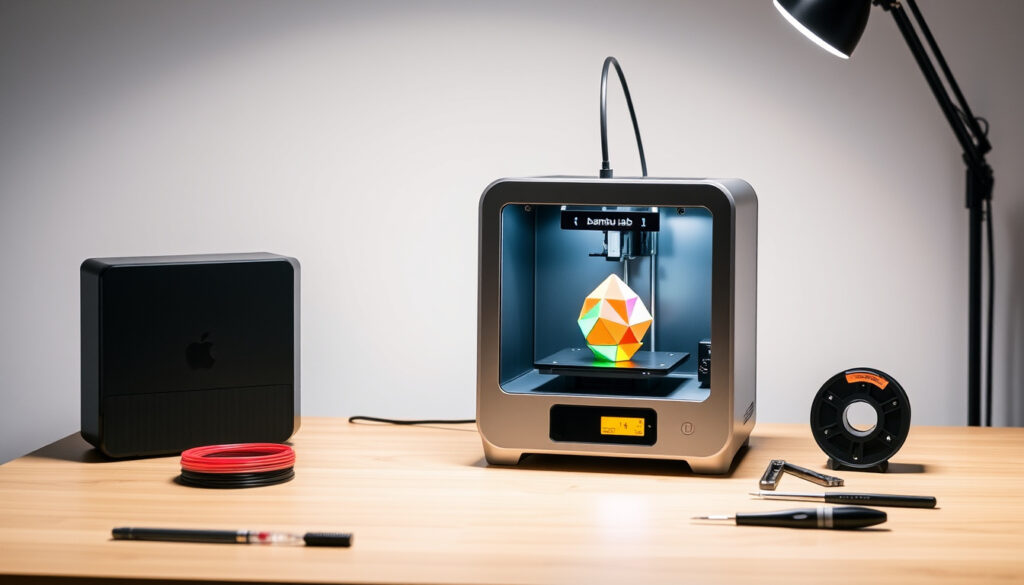
Bambu Lab A1 Mini – Specs, Review, Setup Guide
The Bambu Lab A1 Mini represents a significant entry in the compact 3D printer market, offering high-speed printing capabilities at an accessible price point. This beginner-friendly device has garnered attention for its pre-assembled design and integrated multi-color printing potential through the optional AMS Lite system. With maximum toolhead speeds reaching 500 mm/s, the A1 Mini challenges assumptions about what budget-friendly 3D printers can achieve.
Manufactured by Bambu Lab, a company that has disrupted the 3D printing industry with aggressive pricing and feature-rich hardware, the A1 Mini positions itself as a gateway device for newcomers while delivering enough capability to satisfy experienced makers. The standalone unit starts at $249, though the combo package with AMS Lite for four-color printing ranges from $389 to $459. Early adopters and reviewers have praised its reliability out of the box, noting that the pre-tuning process eliminates the steep learning curve typically associated with desktop 3D printers.
This guide examines the technical specifications, pricing structure, user experience, and competitive positioning of the Bambu Lab A1 Mini to help potential buyers determine whether this compact printer aligns with their needs and expectations.
What is the Bambu Lab A1 Mini?
The Bambu Lab A1 Mini is a compact, open-frame 3D printer designed for beginners and hobbyists who want professional-grade results without extensive technical knowledge. The device measures 347 × 315 × 365 mm and weighs approximately 5.5 kg in standalone configuration, making it suitable for desk-side placement in home offices, classrooms, or maker spaces. Unlike many budget printers that require significant assembly and calibration, the A1 Mini arrives pre-assembled, pre-squared, and pre-tuned, allowing users to begin printing within approximately 20 minutes of unboxing.
$249 – $459
180 × 180 × 180 mm³
500 mm/s
AMS Lite Compatible
- One of the fastest printers in its price class at 500 mm/s maximum toolhead speed
- Full-auto calibration system handles Z-offset, bed-leveling, and vibration compensation
- Pre-assembled design eliminates setup complexity for first-time users
- Multi-color printing available through optional AMS Lite accessory
- Quiet operation under 48 dB suitable for shared living spaces
- WiFi connectivity enables remote monitoring and print queue management
- Integrated 1080p camera allows timelapse recording of print jobs
| Specification | Value | Notes |
|---|---|---|
| Build Volume | 180 × 180 × 180 mm³ (7 × 7 × 7 inches) | Compact footprint limits larger projects |
| Print Speed | Max 500 mm/s; typical 300 mm/s | Max acceleration 10,000 mm/s² |
| Hotend | All-metal, max 300°C | 0.4 mm nozzle included; 0.2/0.6/0.8 mm available |
| Build Plate | Textured PEI (included), max 80°C | Smooth PEI option available separately |
| Noise Level | Under 48 dB (silent mode) | Active motor noise cancelling |
| Sensors | Filament runout, tangle, odometry | Power loss recovery included |
| Interface | 2.4-inch color IPS touchscreen | WiFi, Bambu-Bus, microSD support |
Bambu Lab A1 Mini Specifications
The A1 Mini incorporates several technical innovations that distinguish it from competing budget printers. Its direct drive extruder paired with a high-flow 0.4 mm nozzle enables reliable feeding of flexible filaments including TPU, a material that often causes feeding issues in Bowden-style systems. The all-metal hotend supports temperatures up to 300°C, though Bambu Lab officially recommends sticking to PLA, PETG, TPU, and PVA filaments for optimal results. Engineering materials such as ABS, ASA, polycarbonate, nylon, and carbon fiber composites are not recommended for use with this open-frame device.
Build Volume and Dimensions
At 180 × 180 × 180 mm³, the build volume represents a deliberate trade-off between desktop footprint and practical printing capability. This size accommodates most miniatures, cosplay props, and functional prototypes while keeping the overall printer dimensions compact enough for standard desk setups. Reviewers have noted that the cantilever design provides adequate rigidity for everyday printing, though warping can occur with larger prints that require extended bed adhesion. The textured PEI build plate provides good first-layer adhesion for most filament types without requiring additional adhesion aids.
Print Speed and Performance Features
The A1 Mini achieves its 500 mm/s maximum toolhead speed through a combination of lightweight print head design and advanced motion control algorithms. The maximum acceleration of 10,000 mm/s² allows the printer to maintain high speeds through corners and complex geometry without sacrificing print quality. Active flow rate compensation adjusts extrusion in real-time to account for varying filament diameter and environmental conditions, while vibration compensation minimizes ringing artifacts on printed surfaces. Full-metal linear rails on the X and Y axes provide smooth, repeatable positioning that contributes to the printer’s reputation for consistent output.
For best results with the A1 Mini, stick to PLA, PETG, TPU, and PVA filaments. The open-frame design lacks the thermal stability needed for ABS and other high-temperature engineering materials, which tend to warp or delaminate without an enclosed printing environment.
AMS Lite Compatibility
The AMS Lite represents Bambu Lab’s streamlined approach to multi-color 3D printing, offering four-spool capacity in a compact form factor. Unlike earlier AMS iterations, the Lite version features improved filament path management that reduces tangling and jamming incidents. The system holds spools by their central core, providing compatibility with a broader range of third-party filament brands that may use non-standard spool designs. When bundled with the A1 Mini in the combo package, the AMS Lite transforms the compact printer into an accessible entry point for multi-material projects without requiring the substantial investment needed for enclosed alternatives like the P1S.
The AMS Lite’s central-core spool mounting system accommodates most commercially available filaments. However, users should verify that their chosen third-party filaments have consistent diameter tolerances, as variation beyond ±0.03 mm can affect print quality when using automated calibration systems.
Bambu Lab A1 Mini Price and Availability
The Bambu Lab A1 Mini is available in two primary configurations targeting different user segments. The standalone unit priced between $249 and $299 serves users who need reliable single-material printing without immediate plans for multi-color output. Discounts frequently reduce the standalone price to the $239–$249 range, positioning it competitively against other budget printers from brands like Sovol and Creality. The combo package, priced at $389 to $459, bundles the AMS Lite accessory and additional filament samples, providing everything needed for four-color printing at a price point that reviewers describe as roughly half the cost of comparable P1P setups with similar features.
Availability extends through Bambu Lab’s official store, major electronics retailers including Best Buy, and authorized third-party resellers. The combo package’s price premium of roughly $140–$160 over the standalone represents reasonable value for users interested in experimenting with multi-color prints, given that individual AMS Lite units retail separately at comparable prices. Buyers seeking the Best Carry On Luggage of 3D printers might find the standalone model sufficient for their needs, while those pursuing creative projects requiring color differentiation should consider the combo’s added flexibility.
Is the Bambu Lab A1 Mini Worth It? Reviews and Performance
Independent reviews from technology publications and YouTube creators consistently rank the A1 Mini among the best budget 3D printers available, citing its combination of speed, reliability, and feature density as exceptional value for the price. Tom’s Hardware described it as offering “half the price with more features” compared to the P1P combo, while multiple creators have noted that the printer punches above its weight class in terms of print quality and consistency. The pre-tuning that Bambu Lab performs at the factory means users spend less time troubleshooting first layers and more time actually printing, a factor that beginners particularly appreciate.
Pros and Cons
The A1 Mini excels in several areas that matter most to its target audience. Its auto-calibration system eliminates the need for manual mesh leveling, reducing the technical barrier to entry for first-time users. The 500 mm/s maximum speed enables rapid prototyping and iterative design cycles that would take significantly longer on slower machines. Quiet operation under 48 dB allows the printer to run in bedrooms and shared spaces without disturbance, while the integrated camera enables remote monitoring and timelapse capture of completed prints.
Limitations exist for users with specific requirements. The 180³ mm build volume may prove insufficient for larger projects, and the open-frame cantilever design lacks the thermal stability needed for engineering-grade filaments. Users who need to print with ABS, ASA, polycarbonate, or glass fiber-reinforced materials should consider enclosed alternatives like the P1S. Additionally, while the combo pricing provides good value for multi-color capability, the total investment of $389–$459 exceeds the standalone cost by a significant margin that budget-conscious buyers may find difficult to justify.
User Feedback
Community feedback from forums and review platforms indicates high satisfaction rates among A1 Mini owners, with particular praise for the out-of-box experience and Bambu Studio software integration. The touchscreen interface receives consistent positive mentions for intuitiveness, while WiFi connectivity eliminates the need for physical SD card transfers for most users. Filament runout sensors and power loss recovery provide peace of mind for longer prints, reducing waste from interrupted jobs. The combination of these quality-of-life features with solid mechanical performance has made the A1 Mini a common recommendation in beginner-oriented 3D printing communities.
How to Set Up the Bambu Lab A1 Mini
Setting up the A1 Mini requires minimal technical expertise thanks to its pre-assembled design. Users report spending approximately 20 minutes from unboxing to first print, with most of that time devoted to removing packaging materials and performing initial leveling verification. The Bambu Lab wiki provides detailed guidance, though many users find the included quick-start instructions sufficient for straightforward setup.
Unboxing and Assembly
The packaging contains the printer with shipping locks installed, a power cable, a sample spool of filament, a USB-C cable for firmware updates, and basic tools for nozzle replacement. Removing the shipping locks from the print head and build plate represents the extent of physical preparation required. Users should verify that the build plate is securely seated and the filament guide tube is properly connected before powering on the device for the first time.
First Print Calibration
Upon initial power-on, the A1 Mini automatically runs through calibration routines including Z-offset detection, bed mesh mapping, vibration frequency analysis, and nozzle pressure calibration. This process typically completes within 10–15 minutes and stores calibration data for future reference. The Bambu Studio slicing software on connected devices allows users to select print profiles optimized for their chosen filament, with built-in profiles for major Bambu Lab filament lines and community-developed profiles for third-party materials. Loading filament involves feeding the material through the guide tube until the extruder detects it, after which the printer prompts users to confirm correct extrusion before beginning a print job.
While the A1 Mini performs automatic calibration before each print, users should verify that the build plate is clean and free from debris or residual adhesive from previous prints. Contamination on the PEI surface can affect first-layer adhesion even when calibration data is optimal.
Bambu Lab A1 Mini vs A1: Key Differences
The standard Bambu Lab A1 and the A1 Mini share the same core technology and software ecosystem but differ in physical dimensions and intended use cases. The A1 features a larger build volume of approximately 256 × 256 × 256 mm³, providing roughly twice the printable area for projects that exceed the Mini’s footprint limitations. This size increase comes with corresponding changes to overall dimensions and weight, making the A1 less suitable for space-constrained environments where the Mini’s compact form factor proves advantageous.
Price differences between the two models reflect the hardware variations, with the standard A1 commanding a premium for its expanded capabilities. Both models support AMS Lite integration and benefit from the same auto-calibration features, though the larger A1 may require additional leveling passes for prints spanning its full bed area. Users choosing between these models should weigh the importance of build volume against desk space availability and budget constraints. For beginners exploring desktop 3D printing for the first time, the Mini’s lower entry price and smaller footprint make it an accessible starting point, while those anticipating frequent need for larger prints may find the investment in the standard A1 justified.
Comparing against non-Bambu Lab alternatives reveals similar trade-offs. The Sovol SV07 offers a larger build plate at $339 but lacks native multi-color capability and uses a different firmware ecosystem based on Klipper. The P1S and P1P represent enclosed options at higher price points, with the P1S combo retailing around $949 and providing the thermal stability needed for engineering filaments. The A1 Mini occupies a distinct position as the most affordable entry point into Bambu Lab’s integrated ecosystem, combining speed, automation, and multi-color potential at a price that challenges assumptions about budget printer limitations.
Known and Unknown: What We Have Verified
Several aspects of the Bambu Lab A1 Mini have been thoroughly documented through official specifications and independent reviews. The build volume of 180³ mm, maximum print speed of 500 mm/s, and pricing structure of $249–$299 for standalone and $389–$459 for combo units represent confirmed information available from multiple authoritative sources including the official Bambu Lab store, Tom’s Hardware testing, and independent reviewers such as 3D Print Beginner and The Next Layer.
Other details remain less clearly established. Specific firmware update schedules and feature release timelines are not publicly documented with precision, and users seeking the latest software improvements should consult the official Bambu Lab wiki for current release information. The exact announcement and retail release dates for the A1 Mini are not detailed in available sources, though reviewers describe it as a greatly anticipated product that disrupted the market through aggressive pricing upon launch. Users interested in the full evolution of the product’s software capabilities should monitor official channels for announcements regarding future compatibility with additional filament types and accessories beyond the currently supported AMS Lite.
Final Assessment
The Bambu Lab A1 Mini succeeds in delivering a compelling blend of speed, automation, and accessibility that addresses common pain points for beginner 3D printer users. Its pre-tuned operation eliminates the frustration that often accompanies first-time printer setup, while the 500 mm/s maximum speed provides tangible benefits for iterative design work and prototype development. The optional AMS Lite integration extends functionality into multi-color territory at a price point that democratizes creative exploration previously limited to higher-end equipment.
Limitations exist for users with requirements that exceed the Mini’s capabilities. The build volume restricts larger projects, and the open-frame design precludes reliable printing with high-temperature engineering materials. These constraints do not diminish the printer’s value within its intended use case, however. For makers seeking an accessible entry point into reliable desktop 3D printing, the A1 Mini represents a well-engineered solution that performs consistently without demanding extensive technical knowledge. Those comparing it against alternatives like the Series 10 Apple Watch for their respective categories will find the A1 Mini stands among the most capable options in its price class for delivering immediate, satisfying results.
Sources and Reviews
“Punches above its weight class” — STL Denise 3D, noting the printer’s exceptional value proposition compared to competitors in the same price range.
“Half the price with more features” — Tom’s Hardware, comparing the A1 Mini combo against the P1P combo’s value proposition for multi-color printing.
“Makes 3D printing accessible everywhere” — The Next Layer, highlighting the printer’s quiet operation and beginner-friendly design as key factors in its broad appeal.
Frequently Asked Questions
What filaments work best with the Bambu Lab A1 Mini?
PLA, PETG, TPU, and PVA filaments deliver optimal results with the A1 Mini. The printer handles these materials reliably through its direct drive extruder and auto-calibration system. High-temperature engineering materials like ABS, ASA, polycarbonate, and fiber-reinforced composites are not recommended for this open-frame device.
How fast does the Bambu Lab A1 Mini print?
The A1 Mini achieves a maximum toolhead speed of 500 mm/s with maximum acceleration of 10,000 mm/s². Typical printing commonly runs at around 300 mm/s for a balance between speed and quality.
Is the Bambu Lab A1 Mini enclosed?
No, the A1 Mini features an open-frame cantilever design. This makes it unsuitable for printing with materials requiring controlled thermal environments, but contributes to its compact size and lower price point.
What is the build volume of the A1 Mini?
The build volume measures 180 × 180 × 180 mm³ (7 × 7 × 7 inches). This compact footprint accommodates most miniatures, cosplay props, and functional prototypes while enabling the printer’s small desktop-friendly dimensions.
How do I start printing with the A1 Mini?
Connect the printer to WiFi, load filament through the touchscreen interface, select a print profile in Bambu Studio, and send the job directly to the printer. The auto-calibration system handles bed leveling and other adjustments before each print begins.
Can the A1 Mini print in multiple colors?
The standalone unit prints in single colors only. Adding the AMS Lite accessory, available in the combo package, enables four-color printing by automatically switching between loaded filaments during print jobs.
More related posts
 1.9 m in Feet – Exact Conversion and Height Context
 24 Inch to CM – Exact 60.96 cm Conversion Guide
 First Nations Border Crossing Warning: New Passport Advice
 Fort St John Tickets: Prices, Discounts, Events & Concerts
 Donald Trump Nobel Peace Prize: Has He Won? Latest 2026 News
 Top 10 Jason Statham Movies Ranked by Rotten Tomatoes
 How to Make Ice Cream at Home: Easy No-Machine Recipes
 Porsche 911 GT3 RS Price: New, Used & Global Costs